| src | ||
| web | ||
| .DS_Store | ||
| .gitignore | ||
| LICENSE | ||
| package-lock.json | ||
| README.md | ||

ClimaCore
by BenjiG70
Overview
This repo is build for a weatherstation powered by a WEMOS D1 Mini or ESP32. For web- and database server we use a Raspberry Pi. Here you can get 3D-Models of Serverracks for this.
Version logs
| Version | Description | Date |
|---|---|---|
| 1.0 | basic functionality (webserver with charts and database connectivity); Arduino / ESP8266 tesscript | 2024.11.07 |
| 2.0 | completely reworked ui/ux, databasefunctions and backend | 2025.06.23 |
Getting started
Install Nginx
sudo apt update
sudo apt install nginx
start nginx server
sudo systemctl start nginx
autostart nginx server on boot
sudo systemctl enable nginx
check status
sudo systemctl status nginx
Output shall be: ● nginx.service - A high performance web server and a reverse proxy server Loaded: loaded (/lib/systemd/system/nginx.service; enabled) Active: active (running)
To restart nginx:
sudo systemctl restart nginx
Test configurationfile
sudo nginx -t
if the firewall hit problems
sudo ufw allow 2292
Setup Nginx Server
Nginx configuration File (nginx.conf)
user www-data;
worker_processes auto;
pid /run/nginx.pid;
error_log /var/log/nginx/error.log;
include /etc/nginx/modules-enabled/*.conf;

events {
    worker_connections 768;
    # multi_accept on;
}

http {
    include mime.types;

    server {
        listen 2292; #define port of webserver
        root /var/www/html/dist/web/browser;

        # Optionally, define an index file (like index.html)
        index index.html;

        # Add additional configuration, like handling 404 errors if necessary
        location / {
            try_files $uri $uri/ /index.html;
        }
    }
}
copy angular build file to nginx location
cp -r [path_to_dist_folder] var/www/html/
Install all needed librarys for the database
sudo npm install sqlite3 cors express
test database
node path/to/your/database/folder/database.js
Setup automatic start of the DB server after boot
build a file for the database service
sudo nano /etc/systemd/system/dbserver.service
write your paths and user into the file
[Unit]
Description=Start Database Server via JavaScript
After=network.target

[Service]
ExecStart=path/to/your/node/installation path/to/your/database/folder/database.js
WorkingDirectory=/path/to/your/database/folder
Restart=always
User=your_user
Environment=NODE_ENV=production

[Install]
WantedBy=multi-user.target
enable dbserver.service
sudo systemctl enable dbserver.service
check if enabling is succeed
systemctl is-enabled dbserver.service
output shall be "enabled"
reboot raspy
sudo reboot
check status of db server
sudo systemctl status dbserver.service
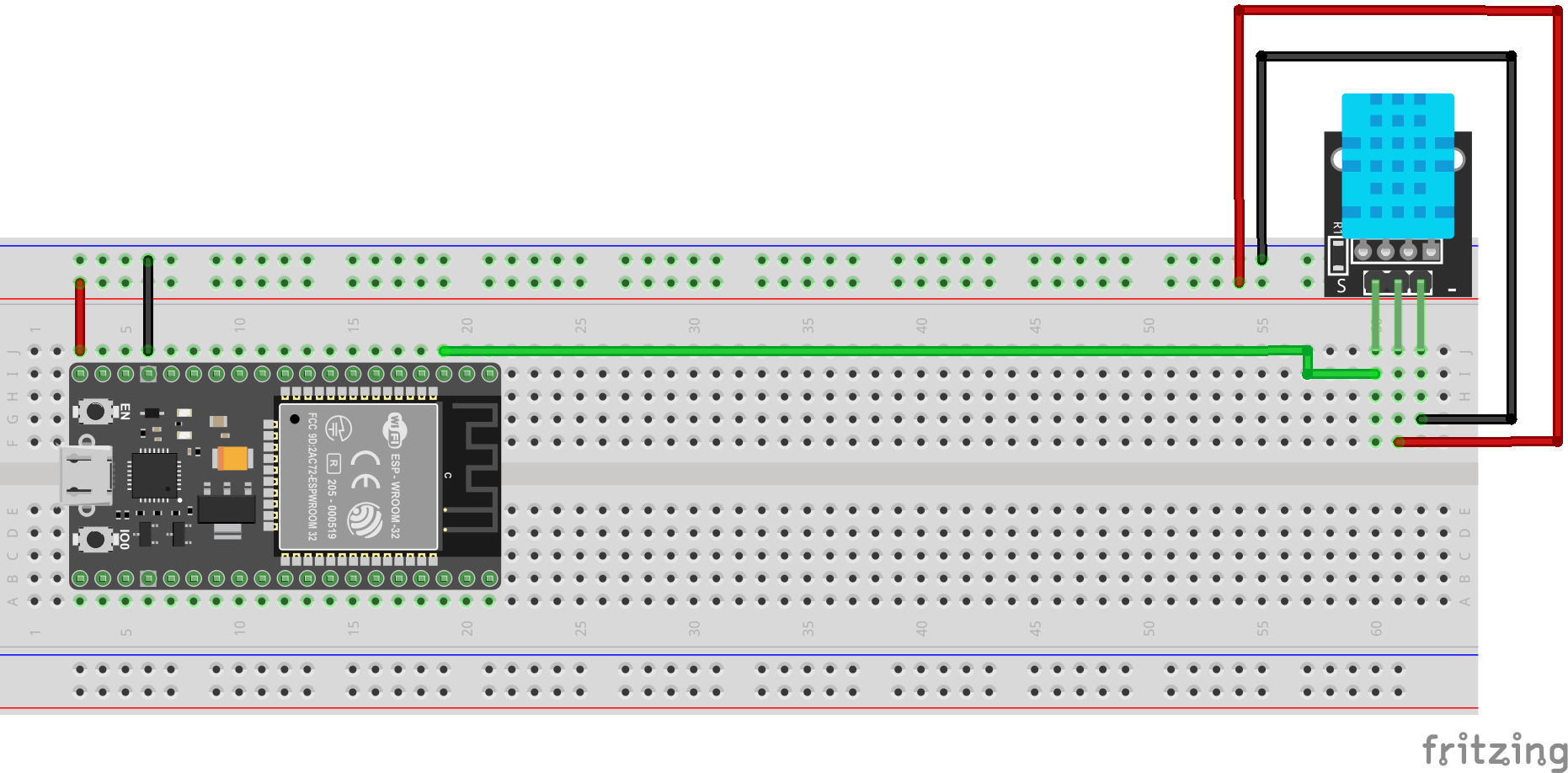
wiring the esp32